


Microphone Blocker - Anti Spy
4.5685.00 Reviews
App Specs
- Version
- 1.86
- Updated On
- License
- Free
- Downloads
- 500,000+
- Developer
- BytePioneers s. r. o.
- Categories
- Libraries & Demo
- Platform
- Android
Screenshots
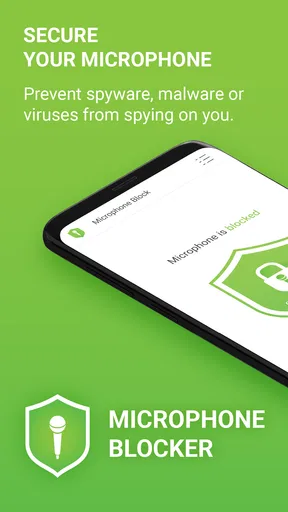

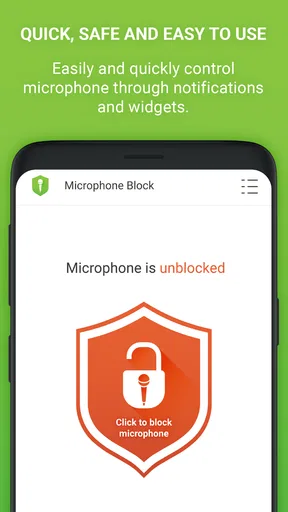
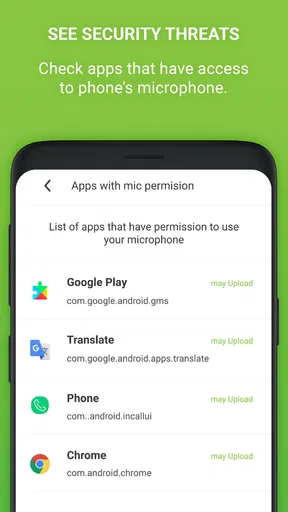
 Analysis by AppCompare
I like privacy tools best when they make one specific job easy to understand. Microphone Blocker - Anti Spy is built around that idea: it gives Android users a way to control microphone access and reduce the chance of unwanted listening. It is a free app from BytePioneers s. r. o., in the libraries and demo section of the app catalog, and it has a focused purpose rather than trying to be an all-purpose security suite. That focus is useful, but it also means you should know what a microphone blocker can and cannot do before relying on it.
A focused tool in its current form
The app has been available since October 28, 2013, and its current version is 1.86. That long presence gives it a more established feel than a brand-new privacy utility, while the version number tells me only where the software stands now—not which changes were made along the way. I would treat its longevity as context, not as proof that it can prevent every form of recording or surveillance.
Its audience is substantial: it has over 500,000 installs, with an average rating of 4.6 from around 9,700 ratings and 684 written reviews. Those numbers suggest that many Android users have found the idea useful, though ratings cannot tell you whether it will behave exactly as you expect on your particular device. It is rated for Everyone, requires Android 6.0 or later, and is free to install, with optional in-app purchases ranging from $3.99 to $89.99 per item. I would check the purchase details in the app before paying for anything, especially if the free controls already cover your needs.
What a microphone block is—and is not
A control that blocks microphone access can be helpful, but I would not mistake it for a complete privacy shield. It addresses the phone’s microphone as a potential route for sound capture; it does not, by itself, settle questions about camera access, location, account security, or information an app has already collected. If your concern is a particular app, the practical first step is to review that app’s Android permission and decide whether its core function really needs microphone access.
There is also a useful distinction between preventing access and noticing it. A privacy alert can help you pay attention to microphone activity, but an alert is not automatically evidence of spying. A voice call, voice message, dictation feature, or assistant may legitimately need the mic. I find the best approach is to treat notifications as prompts to check what you were doing, not as proof that an app has acted maliciously.
Where it fits in an everyday routine
Imagine you are heading into a private appointment and want to keep your phone with you without leaving microphone access open to apps you are not using. A dedicated blocking control can make that choice easier than hunting through several app settings. Afterward, you can restore access when you need to send a voice note or join a call. That kind of deliberate on-and-off routine is where a focused blocker makes the most sense to me: it turns a vague privacy worry into a choice you can make at a specific moment.
For a more reliable routine, I would make a short list of apps that genuinely need audio—perhaps calls, recording, dictation, or voice messaging—and check those individually before blocking access broadly. That avoids the frustrating surprise of discovering that an expected feature cannot hear you. If an app stops responding after you change microphone access, test it again when you have time rather than waiting until you need it urgently.
Worth Reading Before You Choose

EA SPORTS FC Mobile 26 Is a Bigger Football Game, but It Takes Time

Flipboard Shows What News Apps Must Do Beyond the Feed

Switching to Android Auto Means Rethinking Your Driving Routine

Google Calendar Makes a Crowded Week Easier to Manage

Ludo King Makes the Most of the Minutes Between Plans

Baby Panda World Brings Quick Play to Modern Phones, but Its Game Library Feels Busy
Choosing between this and Android’s own controls
Android’s built-in permission settings are the natural alternative. They are a good fit if you want to decide which individual apps can use the microphone and prefer not to install another utility. A dedicated blocker may be more convenient for someone who wants a more immediate, centralized action, but it should complement—not replace—understanding the system’s permission controls. If your goal is to allow a trusted calling app while denying access to one specific social app, per-app permissions may be the clearer choice.
There is a trade-off between convenience and control. A broad blocking action can be quick, but it may interfere with several audio-dependent tasks at once. Per-app settings take more effort to review, yet they let you tailor access to how you actually use the phone. I would choose the method that matches the situation: a broad block for a temporary quiet period, and individual permissions for a lasting decision about an app.
Small checks that prevent bigger annoyances
Before depending on a microphone blocker for an important call, test your usual calling and voice-message apps while the setting is active. This simple check tells you whether your chosen setup is compatible with the way you communicate. It is also worth checking after an Android update or a change to app permissions, since privacy controls and app behavior can interact differently across devices and software versions.
Another useful habit is to notice when an alert appears in context. If you were just recording a voice note, microphone activity is expected; if you were reading a document and an unrelated app seems to request access, that is a reason to review its permission. This is a more measured response than assuming every request is suspicious, and it helps you decide whether to deny access, change a setting, or simply keep using the app as intended.
Getting Started with Microphone Blocker
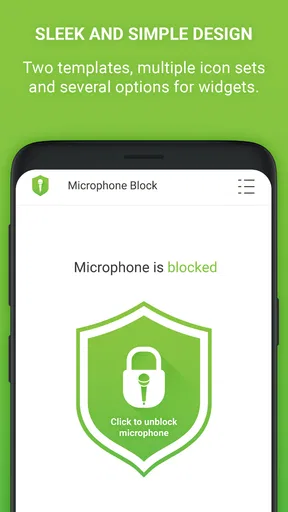
So, diving straight in, the installation was a breeze. I found Microphone Blocker - Anti Spy on the Play Store, and within moments, I was ready to roll. The interface? Clean and straightforward. No fuss, just how I like it. The app greets you with a simple dashboard that makes you feel secure from the get-go.
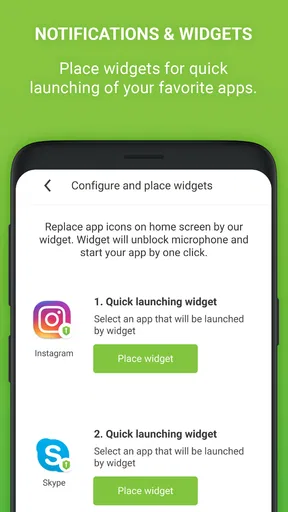
One of the first things I noticed was how easy it is to toggle the microphone blocking on and off. Just a tap, and you’re in control. It's like having a personal bouncer for your phone's mic. The app even allows you to whitelist certain apps, which is super handy if you use apps like voice assistants or dictation tools regularly.
Exploring the Features
Now, let’s talk features. The app doesn't just block your microphone; it alerts you if any app tries to access it without permission. It's like having a watchdog that never sleeps. These notifications are a game-changer, especially in a world where apps can be sneaky little creatures.
Another cool feature is the app’s ability to run silently in the background. You won’t even notice it’s there, but it’s doing its thing, keeping your conversations private. Plus, it doesn't hog your battery, which is a huge plus for someone like me who is always on the go.
Putting It to the Test
Curious about its effectiveness, I put the app through some tests. I tried running apps known for accessing microphones and waited for the notifications. Sure enough, Microphone Blocker - Anti Spy pinged me every time. It’s reassuring to see it work in real-time, confirming that you have the upper hand when it comes to your privacy.
The app also boasts a sleek design, which I think is often overlooked in security apps. The developers clearly understand that we want something that’s not just functional but also pleasant to use. The settings are easy to navigate, and I never found myself lost or confused.
Why Privacy Matters
In an age where smart devices are getting smarter, being cautious about privacy is more important than ever. We carry our phones everywhere, and they hear everything. By using an app like Microphone Blocker - Anti Spy, you’re taking a proactive step in protecting your personal space. It’s like having a digital confidant that ensures your secrets stay secret.
For those wondering about compatibility, the app works seamlessly with the latest Android versions. I’ve encountered no issues on my device, and the updates seem to keep it running smoothly. It's like the developers are always a step ahead, adapting to the latest security needs.
Final Thoughts
All in all, if you're serious about privacy, Microphone Blocker - Anti Spy is a must-have. It’s easy to use, effective, and gives you peace of mind. Sure, there are other apps out there that promise similar features, but this one stands out with its reliability and simplicity.
If you’re tired of that nagging feeling that someone might be listening in, give this app a shot. It’s about time we took control of our privacy, and this app helps you do just that. So go ahead, download it, and let me know what you think!
Who will get the most from it
I think this is best suited to someone who wants a straightforward microphone control and is willing to manage the occasional interruption. It can be useful for people who keep a phone on a desk during confidential work, share a device with family, or simply prefer to close off audio access when they are not using voice features. The appeal is less about complicated security analysis and more about having a clear way to make microphone access part of your routine.
I would not recommend relying on it as the only answer for someone facing a serious, targeted threat. In that situation, careful device security, account protection, permission reviews, and professional advice matter alongside any single app. Nor is it an ideal fit for a person who depends on always-available voice commands or frequent hands-free communication and does not want to adjust access. A blocker is useful only if its restrictions suit your habits.
What to keep in mind as Android changes
Android evolves, and an app’s behavior can depend on the operating system, device manufacturer, and the permissions currently granted. Version 1.86 is the current release, but I would not infer a particular feature history or promise future improvements from that number alone. If you are moving to a new phone, installing a major system update, or changing permission settings, take a moment to confirm that the controls still match your expectations.
The main remaining gap for a prospective user is practical rather than mysterious: you need to establish which apps should keep microphone access and how a block affects them on your own phone. That is a small amount of setup, but skipping it can make the tool feel unreliable when the real issue is that a calling or recording app has been denied access. I would start with low-stakes testing, then use the blocker in situations where the interruption would not cause trouble.
My overall view is that Microphone Blocker - Anti Spy is worth considering if you want a dedicated, easy-to-reach way to manage microphone privacy on Android. Its focused purpose is also its boundary: it can help you control one sensitive capability, but it cannot replace sensible permissions, careful app choices, or broader device security. If that balance sounds right for you, the free installation makes it easy to try the basic workflow; just review any optional purchases before committing and keep your voice-dependent apps in mind.
Pros
- Easy to use with a straightforward interface.
- Effectively blocks unauthorized microphone access.
- Lightweight app with minimal battery usage.
- No intrusive ads interrupting the experience.
- Regular updates for improved security.
Cons
- Limited features in the free version.
- Some devices experience occasional lags.
- Requires permissions that might concern users.
- No support for older Android versions.
- Lacks advanced customization options.
FAQs for Microphone Blocker - Anti Spy
How does Microphone Blocker - Anti Spy protect my privacy?
Microphone Blocker - Anti Spy safeguards your privacy by preventing unauthorized apps from accessing your device's microphone. It provides a simple toggle switch to block microphone access entirely, ensuring that no app can eavesdrop on your conversations without your permission. Additionally, it alerts you if any app attempts to use the microphone, allowing you to take immediate action.
Is Microphone Blocker - Anti Spy easy to use?
Yes, Microphone Blocker - Anti Spy is designed with user-friendliness in mind. The interface is straightforward, featuring a single toggle button to enable or disable microphone access. Users can easily navigate the app without needing technical expertise, making it accessible for everyone concerned about their privacy.
Will Microphone Blocker - Anti Spy affect my phone’s performance?
No, Microphone Blocker - Anti Spy is optimized to run efficiently without affecting your phone's performance. It uses minimal resources, so you won't experience any noticeable lag or battery drain. The app runs quietly in the background, ensuring your privacy without compromising your device's functionality.
Can I choose which apps to block with Microphone Blocker - Anti Spy?
Yes, Microphone Blocker - Anti Spy allows you to customize microphone access on a per-app basis. You can create a whitelist of trusted apps that are allowed to use the microphone while blocking all others. This feature gives you full control over which apps can access your microphone, enhancing your security.
Is Microphone Blocker - Anti Spy compatible with all devices?
Microphone Blocker - Anti Spy is compatible with most Android and iOS devices. However, it's always recommended to check the app's specifications and ensure your operating system version is supported. Regular updates are provided to maintain compatibility with the latest devices and OS versions.


